728x90
728x90
ubuntu에서 셀스크립트를 작성하던 중, conda activate 가 동작하지 않던 문제가 발생.
- non-interactive shell script 의 경우 ~/.bashrc 를 로드하지 않아서 이를 통한 초기화가 수행되지 않음.
- cron 등을 이용한 경우가 전형적인 non-interactive shell script 임.
셀 스크립트 작성방법
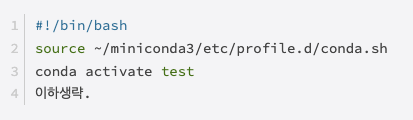
가상환경 이름이 test라고 한다면, 다음과 같이 처리해야 함.
#!/bin/bash
source ~/miniconda3/etc/profile.d/conda.sh
conda activate test
이하생략.
위의 경우는 miniconda를 설치한 경우이며 anaconda인 경우 첫번째 줄을 다음과 같이 변경.
#!/bin/bash
source ~/anaconda3/etc/profile.d/conda.sh
conda activate test
이하생략.
주의사항
주의할 점은 shebang line으로 cond init이 이루어진 shell을 올바르게 지정해야한다.
- conda activate는 셀함수이기 때문에 셀이 다르면 동작하지 않음.
- 원래 로그인해서 interactive shell에서 사용하던 shell을 지정해야함.
[Shell] env and Shebang line
env 명령어는 주로environment variable들을 확인하거나특정 명령어 수행할 때 특정 environment variable을 지정해주는데 사용된다.The env command allows youto display your current environment or run a specified commandin a chan
ds31x.tistory.com
같이 보면 좋은 자료들
[Env] conda 환경설정 스크립트: conda init
환경변수 PATH에 conda를 추가하지 않도록 설치하고 나서,터미널 등에서 conda를환경변수 PATH 에 추가하려면, conda prompt 나 conda가 설치된 경로로 이동한 이후, 다음을 수행하면 됨 (Windows의 경우, anaco
ds31x.tistory.com
728x90
'Programming' 카테고리의 다른 글
| Paradigm (패러다임) (0) | 2022.07.21 |
|---|---|
| [Python] 현재 사용 중인 Python 및 패키지의 실제 경로 확인하기. (2) | 2022.07.18 |
| [Error: Tensorboard] ImportError: cannot import name 'Mapping' from 'collections' (1) | 2022.05.18 |
| [ML] Entropy, KL-Divergence, and Cross-entropy (0) | 2022.05.12 |
| [Conda] miniconda의 기본 채널 변경 : conda-forge (3) | 2022.04.05 |